
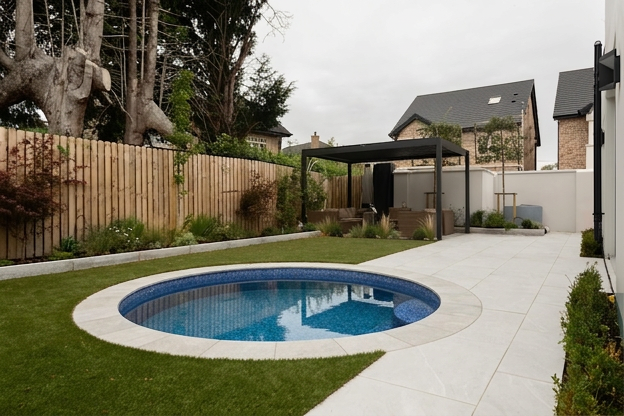
How AI pool design works is simple — you upload a backyard photo, the AI analyzes your space, and generates a photorealistic image of your yard with a pool realistically integrated into it. The entire process takes under 60 seconds and requires no design experience.
Most homeowners spend weeks or months trying to imagine what a pool would look like in their backyard. They scroll through Pinterest, describe ideas to contractors, and make expensive decisions based on nothing more than a 2D blueprint and a gut feeling.
Understanding how AI pool design works changes that completely, but how does it actually work? What happens between the moment you upload your photo and the moment you see your backyard transformed?
This guide explains the entire process — in plain language, no technical background required.
Table of Contents
- What is AI pool design?
- What happens when you upload your backyard photo
- How the AI reads your space
- How the pool gets added to your image
- What makes a good backyard photo for AI pool design
- What AI pool design can and can’t do
- How to use your AI pool design with a contractor
- Frequently asked questions
What Is AI Pool Design?
At its core, how AI pool design works is the use of artificial intelligence to generate realistic visual images showing how a swimming pool would look in your actual backyard — using a photo you take yourself.
Unlike traditional pool design software that requires a professional to build a 3D model of your yard, AI pool design works from a single photo. You upload the image, choose your preferences, and the AI generates a high-resolution visualization in under a minute.
The result looks like a real photograph of your backyard — with a pool in it.
What Happens When You Upload Your Backyard Photo
The process has four distinct stages that happen automatically after you upload your image.
Stage 1: Image analysis
The moment your photo arrives, the AI begins analyzing it at a pixel level. It identifies the boundaries of your yard — fencing, walls, hedges, grass lines, and any existing structures. It maps the perspective of the shot, calculating where the horizon sits relative to the camera height. It reads the lighting direction by analyzing shadows and highlights across the image. And it identifies surface textures — whether your yard has grass, concrete, gravel, soil, or landscaping.
All of this happens in a few seconds and creates an invisible spatial map of your backyard that the AI uses as its working canvas.
Stage 2: Pool placement
Using the spatial map, the AI determines where a pool can realistically sit within your yard. It calculates the available footprint, respects the boundaries of structures and fencing, and selects a placement that follows standard pool installation logic — the same placement a real pool builder would suggest.
If you’ve specified a pool shape or style, the AI places the appropriate template into the calculated position. If not, it selects the most suitable option for your space.
Stage 3: Realistic integration
This is the most technically impressive stage — and the one that separates good AI pool design from poor results. The AI doesn’t simply paste a pool image on top of your photo. It integrates the pool into the scene.
That means the water reflects your actual sky and surroundings. The pool coping matches the perspective and angle of your yard. The surrounding decking or landscaping is rendered to match your existing materials. Shadows from your house, trees, or fencing fall correctly across the pool surface. The lighting temperature of the water matches the time of day in your original photo.
The result is an image that looks like a photograph taken after construction — not a digital mockup.
Stage 4: Output generation
The final image is rendered at high resolution and delivered to your account, typically within 30 to 60 seconds of uploading. You can download it, share it, or use it to generate additional variations with different pool styles, shapes, or materials.
How the AI Reads Your Space
Understanding how the AI interprets your photo explains why image quality matters so much.
The AI uses a combination of computer vision and depth estimation to understand your yard in three dimensions from a flat 2D photo. It identifies vanishing points — the lines in your image that indicate depth and perspective — and uses these to calculate relative distances and proportions.
It also uses semantic segmentation, which is a fancy way of saying it labels every part of your image: this is grass, this is a wall, this is a tree, this is sky. This labeling tells the AI what can be removed, what must be preserved, and where the pool can safely be placed.
The more clearly your photo shows your yard’s structure — its edges, its surfaces, and its perspective — the more accurately the AI can read it and the more realistic your generated design will be.
What Makes a Good Backyard Photo for AI Pool Design
The quality of your input photo directly determines the quality of your output design. Here’s exactly what to do:
Camera height: Take the photo standing up, with your phone or camera at approximately chest to shoulder height — around 5 to 6 feet off the ground. This is the standard perspective that the AI is trained on. Photos taken from ground level or from a ladder produce poor results.
Lighting: Shoot in natural daylight, ideally in the mid-morning or early afternoon when shadows are not too harsh. Avoid overcast days, which flatten the depth that the AI needs to read your space correctly. Never use flash.
Angle: Shoot from one end of your yard looking toward your house, or from a corner that shows as much of the available space as possible. The AI needs to see the full footprint of where the pool will go.
Clutter: If your yard has furniture, toys, a trampoline, or other movable items in the area where you want the pool, remove them before shooting. Clutter confuses the AI’s segmentation and reduces accuracy. Our system can digitally clear some obstacles, but a clean shot always produces better results.
File format: Use JPG or PNG. Avoid heavily compressed images or screenshots from video.
For best results, shoot between 10am and 2pm when sunlight is most even — the American Lighting Association recommends this window for architectural photography.
What AI Pool Design Can and Can’t Do
What it can do:
- Show you a realistic, high-resolution image of your backyard with a pool integrated into it
- Visualize multiple pool shapes — rectangular, freeform, kidney, L-shaped, and more
- Show different materials, finishes, and coping styles
- Incorporate surrounding decking, landscaping, and furniture
- Generate multiple variations so you can compare options side by side
- Produce images clear enough to share with a pool builder for accurate quoting
What it can’t do:
- Replace a professional engineering or structural assessment
- Account for underground utilities, soil conditions, or local building codes
- Provide exact construction measurements or working drawings
- Guarantee that the pool will fit your specific yard without a site survey
- For structural assessments and local code requirements, consult the Association of Pool & Spa Professionals to find a licensed builder in your area.
AI pool design is a visualization and planning tool, not an architectural document. Its purpose is to help you see your options clearly before you commit to a contractor — and to walk into that conversation with a clear image of what you want rather than a vague description.
How to Use Your AI Pool Design With a Contractor
One of the most practical uses of AI-generated pool images is bringing them to your first contractor meeting. Here’s how to get the most out of them:
Share the image before the meeting. Send your AI pool design to the builder before you meet so they can see your vision in advance. This shortens the consultation and means less time spent describing and more time spent pricing.
Use it to communicate style preferences. Words like “modern” or “natural” mean different things to different people. An image removes all ambiguity — you’re both looking at the same visual reference.
Show multiple variations. If you generated designs with different pool shapes or materials, bring all of them. A good contractor will help you understand which options are feasible for your specific yard and budget.
Ask them to mark it up. Many contractors will draw directly on your AI-generated image to show where structures would sit, where equipment would be housed, or where safety fencing would run. This makes the planning conversation much more productive.
Understand it’s a starting point. Your contractor may suggest adjustments based on site conditions, local regulations, or structural requirements. Your AI design is a direction, not a final blueprint — and that’s exactly what it’s designed to be.
Frequently Asked Questions
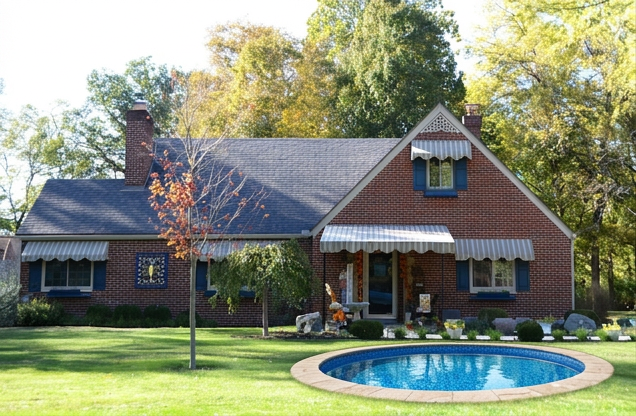
How accurate is AI pool design compared to the real thing, and how does AI pool design work for small yards compared to the real thing? AI-generated pool designs are highly realistic in terms of visual appearance — the pool integrates naturally with your yard’s lighting, perspective, and materials. However, exact proportions may vary slightly from a professionally surveyed design. Think of it as a high-quality preview rather than an architectural rendering.
Do I need any design experience to use AI pool design? None at all. You upload a photo, choose your preferences from simple options, and the AI does the rest. No software skills, no design training, and no technical knowledge required.
How long does it take to get my AI pool design? Most designs are generated within 30 to 60 seconds of uploading your photo. You can generate multiple variations in a single session and compare them side by side.
Will my backyard photo be used to train the AI? At Backyard Pool AI, your photos are used exclusively to generate your specific designs and are never used to train our AI models or shared with third parties.
Can I generate designs for a small backyard? Absolutely. AI pool design works particularly well for small and narrow yards because it shows you exactly what fits — plunge pools, courtyard pools, and compact rectangular designs can all be visualized accurately in tight spaces.
How do I get started? Visit Backyard Pool AI and upload your first backyard photo for free — no credit card required. Your first AI pool design is generated in under 60 seconds.
See How AI Pool Design Works in Your Own Backyard
The best way to understand how AI pool design works is to try it on your own space. Upload a photo of your backyard and see your first AI-generated pool design in under 60 seconds — completely free, no credit card needed.
Published by the Backyard Pool AI team. We help homeowners visualize their dream pool before the first shovel hits the ground.